How to Ensure Consistency in Video Creation Workflows
Discover how to ensure consistency for professional videos with step-by-step actions. Streamline production, align visuals, and deliver cohesive content every time.
How to Ensure Consistency in Video Creation Workflows
Producing high quality videos takes more than creative ideas. Without a solid process, small mistakes can quickly snowball into inconsistent results. In fact, inconsistent standards cause 60 percent of video projects to miss their intended impact. Clear steps like defining technical guidelines and unifying editing styles help teams deliver polished, brand-consistent content every time. Learn how a few thoughtful changes can elevate every stage of your video production workflow.
Table of Contents
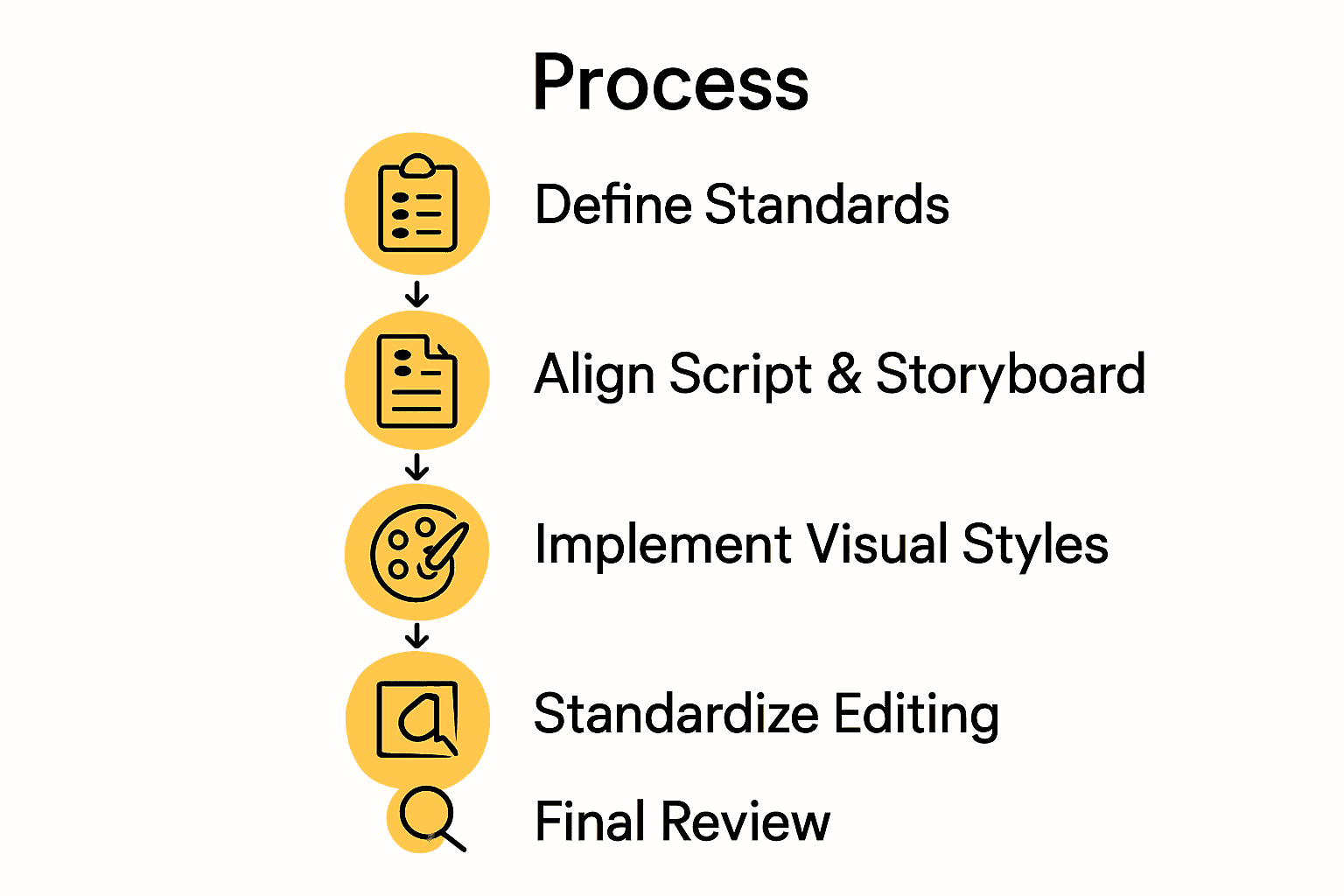
- Step 1: Define Clear Video Standards
- Step 2: Align Script And Storyboard Details
- Step 3: Implement Consistent Visual Styles
- Step 4: Standardize Editing And Transitions
- Step 5: Review Final Output For Cohesion
Quick Summary
| Key Point | Explanation |
|---|---|
| 1. Establish clear video standards | Document technical and creative specifications to ensure consistent quality across all video productions. |
| 2. Align scripts with storyboards | Create a detailed match between script segments and visual plans to minimize miscommunication during production. |
| 3. Implement consistent visual styles | Develop a visual style guide to maintain a cohesive look and feel throughout your video content. |
| 4. Standardize editing transitions | Create guidelines for scene transitions to enhance narrative continuity and viewer engagement. |
| 5. Review final output thoroughly | Conduct a systematic review of the video to ensure all elements align and resonate with the audience effectively. |
Step 1: Define clear video standards
Establishing consistent video standards is your foundational step in creating professional content that maintains quality across all your productions. By implementing clear technical and creative guidelines, you ensure every video meets your brand's specific requirements and professional expectations.
Start by documenting precise technical specifications using industry frameworks like SMPTE 2110, a comprehensive suite of standards for digital media transmission over IP networks. This means defining specific parameters such as resolution, frame rate, color depth, audio specifications, and compression formats. Your documentation should cover aspects like:
- Minimum video resolution (1080p, 4K)
- Consistent frame rates (24fps, 30fps, 60fps)
- Specific color profiles and bit depths
- Audio recording standards (sample rates, channels)
- File format requirements
- Compression and encoding guidelines
To create truly robust standards, consider both technical and creative dimensions. Beyond technical specs, outline creative expectations like visual style, color grading preferences, lighting approaches, and narrative tone. This holistic approach ensures that whether an in house team or external creator produces content, the result will consistently reflect your brand's unique visual identity.
Pro Tip: Develop a comprehensive style guide that team members can easily reference. Include visual examples, do and dont screenshots, and clear explanations to make your standards actionable and understandable.
With these standards established, you create a repeatable framework that streamlines production, reduces editing time, and maintains a consistent brand aesthetic across all your video content.
Step 2: Align script and storyboard details
Aligning your script and storyboard is a critical process that transforms your creative vision into a concrete visual roadmap. According to Meegle, a structured workflow template ensures meticulous planning and execution in video creation.
Begin by creating a side-by-side document that matches each script segment with its corresponding visual representation. This means breaking down your script into specific scenes and mapping out exactly how each narrative moment will be visually interpreted. For each script section, document:
- Specific camera angles
- Planned shot compositions
- Dialogue or narration timing
- Proposed visual transitions
- Key visual elements or props
- Emotional tone of the scene
As recommended by Nevada CTE Standards, maintaining consistency between script and storyboard is crucial for video quality. This alignment helps your entire production team understand the exact vision before filming begins, reducing potential miscommunications and reshoots.
Pro Tip: Use color coding or visual markers to highlight connections between script text and storyboard frames. This makes the relationship between written content and visual interpretation immediately clear.
With a fully aligned script and storyboard, you create a powerful blueprint that guides your entire production team toward a unified creative vision.
Step 3: Implement consistent visual styles
Implementing consistent visual styles is the key to creating professional and cohesive video content that resonates with your audience. According to VIA Framework, a unified approach ensures consistent visual styles across both global and local video edits, transforming raw footage into a polished narrative.
Start by developing a comprehensive visual style guide that covers every aspect of your video aesthetics. This guide should include precise specifications for:
- Color palette and grading
- Lighting techniques and temperature
- Camera movement and framing styles
- Graphic design elements
- Transition styles
- Typography and on screen text design
MagicEdit research emphasizes the importance of temporal coherence in video editing, which means maintaining visual consistency not just within a single shot, but across the entire video sequence. Pay special attention to how colors, textures, and visual elements flow from one scene to another, creating a seamless viewing experience.
Pro Tip: Create a visual mood board that captures your desired aesthetic. Include reference images, color swatches, and example shots to provide a clear visual reference for your entire production team.
By meticulously implementing and enforcing these visual style standards, you transform your video from a collection of shots into a unified and professional visual story that captures your unique brand identity.
Step 4: Standardize editing and transitions
Standardizing your video editing and transitions creates a polished and professional viewing experience that keeps your audience engaged. AutoTransition research demonstrates how intelligent recommendation systems can help creators learn and implement consistent transition effects that enhance overall video cohesion.
Develop a comprehensive transition rulebook that outlines specific guidelines for how scenes should connect. This means establishing clear protocols for:
- Default transition types (dissolve, cut, fade)
- Transition duration and timing
- Acceptable transition styles per content type
- Rhythm and pacing between scene changes
- Technical parameters for transition effects
- Emotional context of transitions
As recommended by Video Documentation Guidelines, transitions are not just technical elements but narrative tools that guide viewer perception. Select transitions that complement your content mood intentionally technical precision meets storytelling finesse.
Pro Tip: Create a transition template library with preset effects that match your brand aesthetic. This allows your team to quickly apply consistent styles while maintaining creative flexibility.
By implementing these standardized editing and transition protocols, you transform your video from a series of disconnected shots into a smooth narrative experience that feels intentional and professional.
Step 5: Review final output for cohesion
Reviewing your final video output ensures that all your carefully planned elements come together into a seamless storytelling experience. American University's Video Production Primer emphasizes that editing is not just about technical precision but about crafting a narrative that resonates with viewers.
Conduct a comprehensive review process that systematically examines multiple aspects of your video:
- Narrative flow and logical progression
- Visual consistency across scenes
- Audio quality and synchronization
- Adherence to established style guidelines
- Emotional impact and viewer engagement
- Technical performance and rendering quality
As highlighted by research on Understanding the Basics of Video Editing, cutting, pacing, and transitions fundamentally shape audience experience. Watch your video multiple times from different perspectives. First, review for technical accuracy. Then, watch as a viewer would to assess the overall storytelling impact.
Pro Tip: Gather feedback from team members who were not directly involved in production. Fresh eyes can often catch inconsistencies or suggest improvements you might have overlooked.
A meticulous final review transforms your video from a collection of edited segments into a compelling narrative that communicates your intended message with clarity and professional polish.
Unlock Seamless Consistency in Your Video Production Workflow
Creating videos that look and feel consistent can be a frustrating challenge. From defining clear video standards to aligning scripts with storyboards and ensuring visual style continuity your creative vision deserves tools that make this process effortless. The complexities of standardizing editing, transitions, and final reviews often slow down production and dilute storytelling impact. You want a solution that bridges these gaps and lets you focus on creativity without getting bogged down in technical details.
Palmedor.ai is designed exactly for creators facing these challenges. Our AI-powered platform helps you establish and maintain professional video consistency by turning simple prompts or images into polished cinematic videos. With features like automated script generation, smart scene management, and customizable outputs you can easily implement the consistent video standards and aligned storyboards emphasized in the article. Explore how our smart presets and editing tools support smooth transitions and cohesive visual styles while speeding up your entire workflow.

Ready to transform your video creation process and ensure every project meets your exacting quality standards? Visit Palmedor.ai now. Experience how AI-powered tools can streamline your workflow and empower you to deliver stunning, brand-consistent videos with minimal effort. Don’t let inconsistency hold back your storytelling. Start building pro-level videos today with Palmedor.ai and explore our FAQs and example cases to master a smooth video production journey.
Frequently Asked Questions
How can I define clear video standards for my team?
Establish clear video standards by documenting specific technical and creative guidelines. Include parameters such as resolution, frame rates, audio specifications, and visual elements in a style guide that your team can easily reference.
What should I include when aligning my script and storyboard?
When aligning your script and storyboard, break down the script into scenes and map out how each moment will be visually interpreted. Document details like camera angles, shot compositions, and emotional tones to create a cohesive blueprint for your production team.
How do I implement consistent visual styles across videos?
To implement consistent visual styles, develop a comprehensive visual style guide that outlines color palettes, lighting techniques, and graphic design elements. Use this guide to ensure that all video content aligns with your brand's aesthetic and maintains a professional appearance.
What steps should I take to standardize editing and transitions?
Standardize your editing and transitions by creating a transition rulebook that specifies default transition types, their durations, and acceptable styles for different content. This will help maintain a uniform rhythm and pacing throughout your videos, enhancing viewer engagement.
How can I conduct an effective review of my final video output?
Conduct an effective review by examining narrative flow, visual consistency, and audio quality, focusing on adherence to established style guidelines. Gather feedback from team members not involved in production to gain fresh insights on areas for improvement.