How to Create Script for Video: Step-by-Step Workflow
Learn how to create script for video from idea to final review with a clear step-by-step process for producing engaging, professional video scripts easily.
How to Create Script for Video: Step-by-Step Workflow

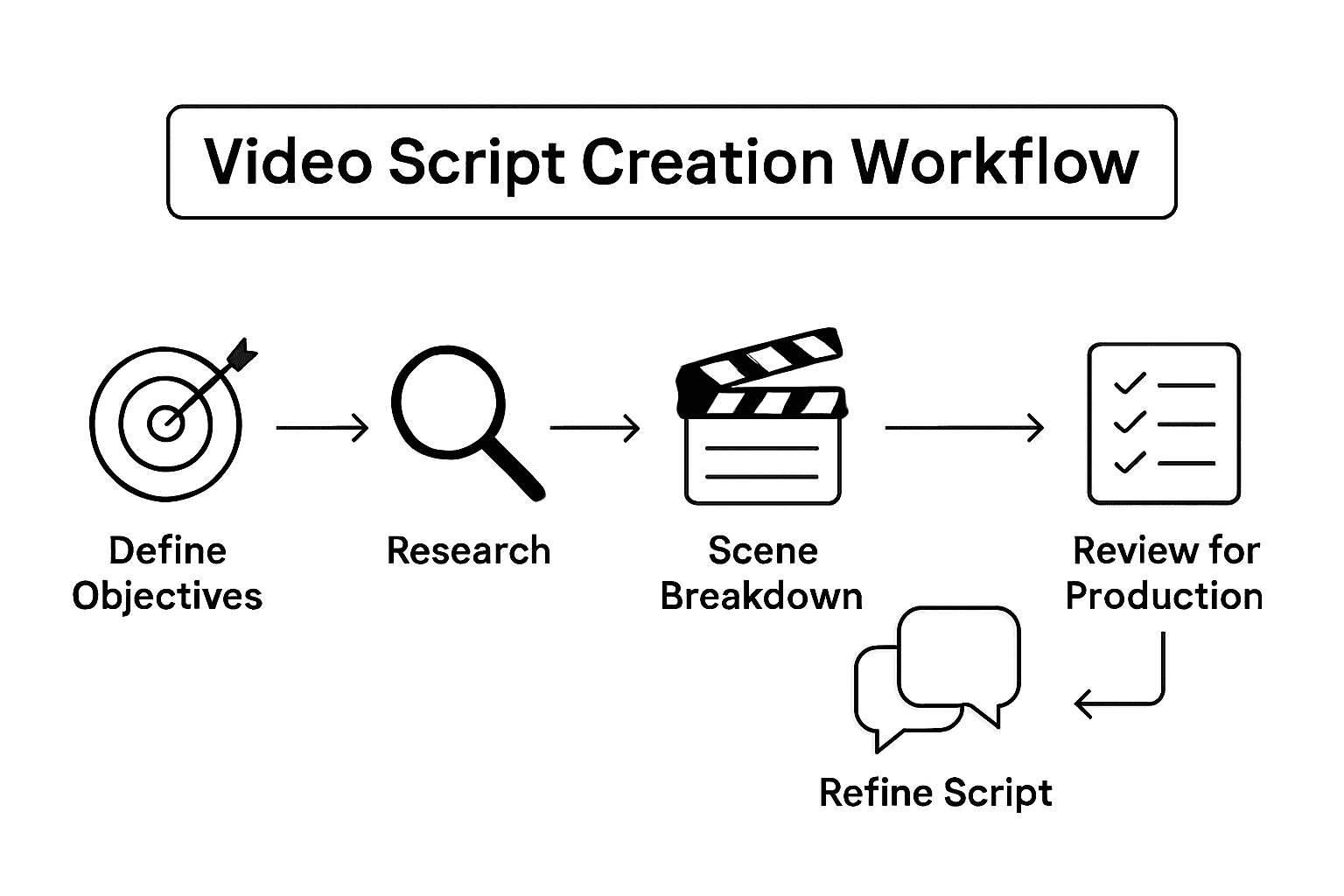
Most American businesses underestimate how much a well-defined video objective shapes success. With video now accounting for over 80 percent of all internet traffic, simply pressing record is not enough. Knowing exactly who you want to reach and what you want to achieve gives your video a solid foundation that guides every creative and strategic decision. This guide takes you from setting clear goals to refining your message for real impact.
Table of Contents
- Step 1: Define Video Objectives And Target Audience
- Step 2: Research Key Messages And Gather Reference Material
- Step 3: Draft Scene-By-Scene Script Structure
- Step 4: Refine Dialogue And Visual Cues For Clarity
- Step 5: Review And Optimize Script For Production
Quick Summary
| Key Point | Explanation |
|---|---|
| 1. Define objectives clearly | Start with precise goals for your video to guide your creative process and messaging strategies effectively. |
| 2. Understand your target audience | Research demographics, interests, and media habits to tailor your video content and format for maximum engagement. |
| 3. Draft a detailed script structure | Create a scene-by-scene outline to ensure a cohesive narrative that maintains viewer interest and aligns with your objectives. |
| 4. Refine visuals and dialogue | Polish your script by simplifying language and enhancing visual cues to ensure clarity and engagement with your content. |
| 5. Review scripts for production readiness | Conduct thorough script evaluations to gather feedback and prepare a detailed breakdown for logistical execution during filming. |
Step 1: Define video objectives and target audience
Creating a successful video starts with crystal clear objectives and a deep understanding of who you want to watch it. Before hitting record, you need a strategic roadmap that transforms your creative vision into a targeted communication tool.
Begin by asking yourself fundamental questions about your video's purpose. Are you aiming to educate viewers about a complex topic, entertain them with engaging storytelling, or persuade them to take a specific action? Understanding the core goals of your video project helps determine the right creative approach and messaging strategy. Research your target audience thoroughly by creating detailed personas that capture their demographics, interests, challenges, and media consumption habits. This means going beyond basic age and gender statistics and diving into their motivations, learning styles, and preferred content formats.
Your audience research should inform every aspect of your video strategy. If you're creating content for young professionals, your tone and visual style will differ dramatically from a video targeting senior executives or college students. Consider the platforms where your audience spends time and tailor your video length, format, and style accordingly. A 30-second social media clip requires a different approach than a 10-minute educational tutorial.
Pro tip: Create a one-page creative brief that summarizes your video objectives, target audience profile, key messages, and desired outcomes. This document will serve as your north star throughout the video production process, keeping your entire team aligned and focused on delivering a compelling final product.
Here's a summary of how video objectives shape production strategy:
| Objective Type | Content Approach | Length & Platform |
|---|---|---|
| Educate | Clear explanations, visuals | Longer, tutorials, YouTube |
| Entertain | Story-driven, humor, pacing | Short, social platforms |
| Persuade | Strong calls to action, testimonials | Varies, landing pages |
| Inspire | Emotional stories, uplifting visuals | Medium, company blogs |
Step 2: Research key messages and gather reference material
After defining your video objectives, it is time to dig deep into research and collect the raw materials that will bring your creative vision to life. This stage is about gathering comprehensive information that will inform and enrich your video content.
Understanding why you want to create this specific video is crucial before collecting reference materials. Ask yourself critical questions about the core message you want to communicate. What unique perspective or insight will you provide? What specific takeaway skill, concept, or principle do you want viewers to learn? Start by creating an idea table that maps out all the necessary elements you want to include in your video. This means listing potential topics, key points, storytelling angles, and visual references that align with your original objectives.
Your research should be thorough and multifaceted. Explore academic sources, industry reports, expert interviews, and relevant multimedia content that can provide depth and credibility to your video. Organize your findings systematically, noting down potential quotes, statistics, case studies, and visual inspiration. Pay attention to the tone, style, and approach of similar content in your field to understand what resonates with your target audience. Consider different media formats like documentaries, TED talks, online tutorials, or industry presentations that might offer insights into effective storytelling techniques.
Pro tip: Create a digital research folder or mood board where you collect all your reference materials, screenshots, notes, and inspirational content. Use tools like Evernote, Pinterest, or Google Drive to keep everything organized and easily accessible throughout your video production process.
This table compares different methods for gathering reference material for video projects:
| Research Method | Best Use Case | Typical Sources |
|---|---|---|
| Academic Research | In-depth accuracy | Journals, reports |
| Industry Analysis | Trend tracking | Market studies, whitepapers |
| Expert Interviews | Unique insights | Thought leaders, practitioners |
| Multimedia Review | Visual and stylistic ideas | Documentaries, online videos |
Step 3: Draft scene-by-scene script structure
With your research complete, it is time to transform your ideas into a cohesive narrative blueprint. Deciding how long your video will be and whether it will be fully scripted is crucial for creating an effective visual story.

Start by breaking down your video concept into discrete scenes that flow logically and maintain viewer engagement. Each scene should have a clear purpose that advances your overall narrative or communicates a specific message. Consider using a two column format where you document both visual descriptions and corresponding dialogue or narration. This approach helps you visualize how each scene will unfold and ensures that your visual and audio elements work together harmoniously. Think about the emotional arc of your video and how each scene contributes to building tension, delivering information, or creating a memorable viewer experience.
Remember that different video types require different scripting approaches. An instructional video needs a more structured scene progression compared to a narrative documentary or brand story. Map out the key beats of your video, identifying moments of explanation, demonstration, emotional connection, and call to action. Pay attention to scene transitions and how one moment will smoothly lead to the next. Your goal is to create a script that feels natural and compelling while staying true to your original objectives.
Pro tip: Create a flexible script template that allows room for creative improvisation. While detailed scripting is important, leave space for organic moments that might emerge during actual filming and could enhance your video's authenticity.
Step 4: Refine dialogue and visual cues for clarity
With your initial script structure complete, it is time to polish your content to ensure maximum viewer comprehension and engagement. Planning the visuals, graphics, and audio elements that will enhance your content becomes critical in transforming your script from good to exceptional.
Carefully review each scene and dialogue segment, focusing on simplicity and directness. Complex language can alienate viewers, so aim to communicate your message using clear, conversational terminology. Read your script aloud to identify awkward phrasings or sentences that sound unnatural when spoken. Pay special attention to technical terms or industry jargon that might confuse your audience. Consider creating a glossary or using visual explanations for complex concepts to enhance understanding. Your visual cues should complement and reinforce your spoken content, creating a seamless narrative experience that guides viewers through your story.
Think strategically about how your visual elements can support and elevate your dialogue. For instructional or demonstration style videos, visual cues become especially important in breaking down complex processes. Use annotations, graphics, close-ups, or animated overlays to highlight key points. Color coding, text callouts, and strategic camera movements can help emphasize critical information. Your goal is to create a symbiotic relationship between what viewers hear and what they see, ensuring that each scene communicates your message with maximum impact and minimal confusion.
Pro tip: Create a color-coded script where dialogue is matched with specific visual descriptions. This approach helps your production team understand exactly how audio and visual elements should interact in each scene.
Step 5: Review and optimize script for production
With your script drafted, it is time to transform your creative vision into a production-ready blueprint. The strategy and preparation meeting becomes crucial for identifying and understanding your video goals, helping you determine the best solutions and creative approach for bringing your script to life.
Conduct a comprehensive script review by gathering feedback from multiple perspectives. Invite team members with different expertise to analyze your script for technical accuracy, narrative flow, emotional resonance, and production feasibility. Look for potential bottlenecks or complex sequences that might create challenges during filming. Pay attention to dialogue pacing, scene transitions, and the overall narrative arc. Consider running a table read where team members perform the script aloud, which can help you identify awkward phrasings, unrealistic dialogue, or moments that do not translate well from written to spoken format.
Prepare a detailed production breakdown that maps out technical requirements, resource needs, and potential logistical challenges for each scene. This includes assessing location requirements, talent needs, special equipment, potential shooting constraints, and estimated time for each sequence. Create a realistic timeline that accounts for potential complexities, and be prepared to make strategic compromises without sacrificing your core creative vision. Your goal is to develop a script that is not just creatively compelling, but also pragmatically achievable within your production constraints.
Pro tip: Create a script version control system where each major revision is numbered and archived. This helps track changes, ensures everyone is working from the most recent version, and provides a clear historical record of your script development process.
Streamline Your Video Script Creation with AI-powered Precision
Creating a clear, engaging script for your video can be overwhelming. The step-by-step workflow in this article highlights key challenges like defining objectives, researching messages, drafting scenes, refining dialogue, and preparing production-ready scripts. These tasks require time, creativity, and careful organization to ensure every visual cue and line delivers maximum impact. If you struggle with balancing clarity, emotional connection, and technical feasibility in your scripts, you are not alone.
Palmedor.ai is designed to solve these exact problems. Our AI-driven platform transforms your ideas and simple prompts into polished video scripts and fully managed scenes. From script generation to scene management and output customization, Palmedor.ai simplifies the detailed processes described in the article. Whether you need tutorial videos, brand films, or captivating social clips, the platform lets you focus on your creative vision while we handle the complex scripting and production steps. Discover how to turn your drafts into ready-to-produce content efficiently with smart presets and flexible editing.
Explore the future of video production at Palmedor.ai and see example cases and features tested against the challenges of script clarity and flow as explained in the workflow steps.
Take control of your video storytelling today and bring your scripts to life effortlessly.
Looking for the perfect tool to build your next winning script and video project?

Visit Palmedor.ai to get started with AI-powered video creation that streamlines your entire workflow. Turn your written ideas into cinematic videos with precision and ease now.
Frequently Asked Questions
What are the key steps in creating a script for video?
To create a video script, start by defining your video objectives and understanding your target audience. Next, research key messages and gather reference materials, draft a scene-by-scene structure, refine dialogue and visual cues, and finally review and optimize your script for production.
How do I define my video's objectives and target audience?
Define your video's objectives by determining its primary purpose, whether to educate, entertain, persuade, or inspire. Create detailed audience personas by researching demographics, interests, challenges, and media consumption habits to tailor your content effectively.
What should I include in my research for video scripting?
Include a comprehensive range of materials such as academic sources, industry reports, and expert interviews to provide depth to your content. Organize your findings into a digital folder or mood board to easily access potential topics, quotes, and visual inspiration during the scripting process.
How do I structure my script scene-by-scene effectively?
Break your video script into discrete scenes that have clear purposes aligned with your overall narrative. Use a two-column format to map out visual descriptions alongside dialogue or narration, ensuring that each scene flows logically and keeps viewer engagement.
How can I refine dialogue and visual cues for clarity?
Polish your script by simplifying language and using clear, conversational terminology. Read your script aloud to catch awkward phrases, and complement dialogue with visual cues like graphics or annotations to enhance the viewer's understanding.
What should I do during the script review process before production?
Gather feedback from various team members to assess narrative flow, technical accuracy, and production feasibility. Conduct a table read of your script to identify any awkward dialogue or pacing issues, ensuring that your final version is smooth and engaging.